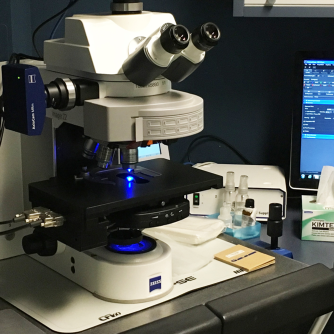
Zeiss Axio-Imager Z2 upright microscope

J-A Bombardier Building, Room 3223
Advanced Microscope Tier 1 usage price

Instrument awarded to Dr. Pascal Chartrand by the Canadian Foundation for Innovation (CFI) in 2015

Applications

  • Upright microscope
  • Widefield imaging
    • Brightfield
    • Phase contrast
    • DIC
    • Fluorescence


Description

Light sources

  • LED lamp for transmitted light

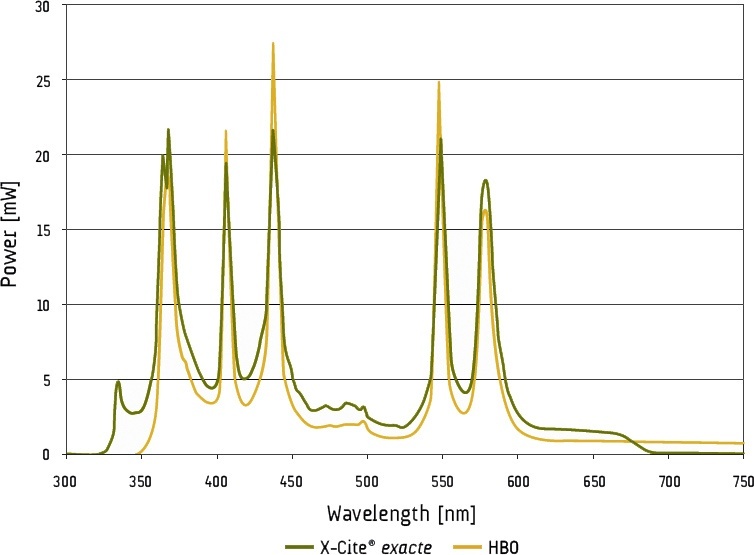
  • 200 W X-Cite Exacte for fluorescence

Filter cube

Light intensity (mW)

2024/07/03

Light intensity (mW)

2025/10/29

Light intensity (mW)

2026/01/22

(new bulb)

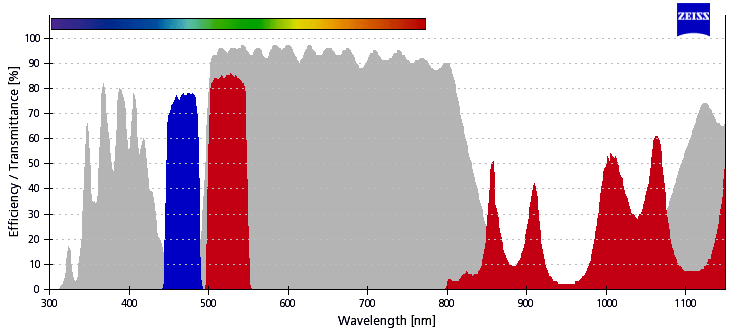
38 HE GFP

68.6 @480nm

62.5

103

43 HE DsRed

118 @550nm

109

165

45 TxRed

174.9 @570nm

160

249

46 HE YFP

31 @500nm

28

47.6

49 DAPI

41 @380nm

36.7

73.6

50 Cy5

42.9 @640nm

36

54

Cy3.5n (SP103)

56.8 @570nm

53

80

Cy3n (SP102)

63.5 @550nm

60.3

87.5


Objectives

  1. 10x/0.30 Air

  2. 20x/0.80 Air

  3. 40x/0.75 Air
  4. 63x/1.40 Oil

  5. 100x/1.30 Oil
  6. 100x/1.40 Oil

Position

Name

Brand

Full name

ID

Magnification

Numerical Aperture

Immersion

Type

Working distance (mm)

Transmittance

(% [nm])

Technique

Cover glass thicjkness (mm)

1

10x/0.30
Air

Zeiss

10x/0.3 DIC I
EC Plan-Neo Fluar

420340-9901-000

10x

0.3

Air

Plan Neofluar

5.2

>90% [480-780]

BF, DIC, Fluo

0.17

2

20x/0.80
Air

Zeiss

20x/0.8 DIC II
Plan-Apochromat

440640-9903-000

20x

0.8

Air

Plan Apochromat

0.55

>90% [410-800]

BF, DIC, Fluo

0.17

3

40x/0.75

Air

Zeiss

40x/0.75 DIC II
EC Plan-Neofluar

420360-9900-000

40x

0.75

Air

Plan Neofluar

0.71

>90% [410-780]

BF, DIC, Fluo

0.17

4

63x/1.40
Oil

Zeiss

63x/1.4 DIC III
Plan-Apochromat

420782-9900-000

63x

1.4

Oil

Plan Apochromat

0.19

>80% [440-710]

BF, DIC, Fluo

0.17

5

100x/1.30
Oil

Zeiss

100x/1.3 DIC III
EC Plan-Neofluar

420490-9900-000

100x

1.3

Oil

Plan Neofluar

0.20

>80% [400-820]

BF, DIC, Fluo

0.17

6

100x/1.40
Huile

Zeiss

100x/1.4 DIC III
Plan-Apochromat

420792-9900-000

100x

1.4

Oil

Plan Apochromat

0.17

>80% [400-820]

BF, DIC, Fluo

0.17

Filters

  1. DAPI
  2. GFP
  3. YFP
  4. DsRed/Cy3
  5. TexRed
  6. Cy3.0 narrow
  7. Cy3.5 narrow
  8. Cy5
  9. DIC analyzer
  10. Empty

Position

Name

Brand

ID

Excitation

Dicrhoic

Emission

Comments

1

DAPI
Filter Set 49

Zeiss

488049-9901-000

365/50

[340-390]

395LP

445/50

[420-470]


2

GFP
Filter Set 38

Zeiss

000000-1031-346

470/40
[450-490]

495LP

525/50

[500-550]


3

YFP
Filter Set 46

Zeiss

000000-1196-681

500/20

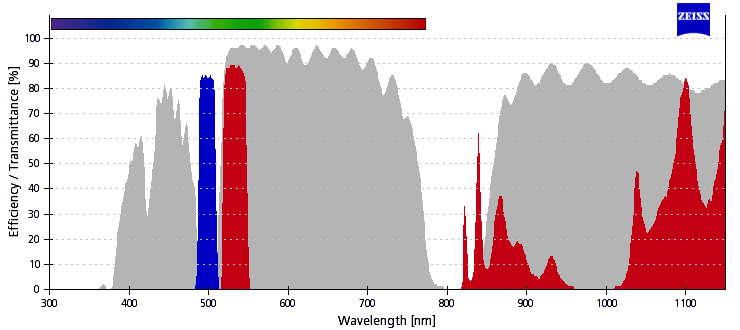
[490-510]

515LP

535/30

[520-550]


4

DsRed
Filter Set 43

Zeiss

000000-1114-101

545/25

[533-557]

570LP

605/70

[570-640]


5

TxRed
Filter Set 45

Zeiss

000000-1114-462

560/40

[540-580]

585LP

630/75

[593-667]


6

Cy3.0 narrow

Chroma

SP102v1

546/11
[541-551]

557LP

567/15

[560-574]


7

Cy3.5 narrow

Chroma

Custom

CT580/10bp

[576-585]

T590lpxr

ET620/40

[600-640]


8

Cy5

Chroma

49009

640/30
[625-655]

660LP

690/50

[665-715]


9

Analyzer DIC

Zeiss


10

-


Detector

  • Photometrics Prime

Camera

Photometric Prime

Sensor Type

sCMOS

Sensor Category

Monochrome

Nb Pixels

4.2 M

Pixel Layout

2048 x 2048

Pixel size

 6.5 um

Sensor size

13.3 mm x  13.3 mm

Sensor diameter

18.8 mm

Bit depth

16-bit
Speed at full resolution100 images/s

Max QE

 72 % at 550 nm
Reading noise 1.3 e⁻

Cooling

Forced air -10°C

Dark Current

0.06 e⁻/pixel/sec

Full well capacity

30 000 e-

Dynamic Range

1:30000

Interface

Dual Camera Link PCIe
USB3.0

Mount

C-mount

User Guide

  1. If not already done, turn on the computer (#1) and log in to Windows using your UdeM credentials
  2. Remove the dust cover from the microscope
  3. Turn on the X-Cite exacte lamp on the shelf to the left of the microscope (#2)

    The exact X-Cite lamp must be turned on for at least 30 minutes before being turned off and vice versa

    The X-Cite exact lamp display will flash during heating (approximately 4 minutes) and will then be operational.

  4. Turn on the microscope power bar (#3) on the shelf above the computer

  5. Press the microscope start button located on the rear left of the microscope (#4)
  6. When using the instrument for the first time, it is necessary to import the microscope configuration before starting the software. See the First Use section below.
  7. Start Zen

When using the instrument for the first time, it is necessary to import the microscope configuration into the software. This procedure is usually carried out during the training session. However, it can also be used to reset the software if it does not display correctly, for example. Running this procedure will erase all your experiment protocols and reset the software to its original settings (ask for support if you are not sure).

  1. If Zen is opened, close it and wait until it has completely shut down (this may take up to 30 seconds)

  2. On the Desktop, open the Software folder

  3. Double-click Zen Settings for Zeiss Axio-Imager Z2

  4. A script will run and a black window will appear briefly

  5. When the message Settings for Zen have been imported successfully appears, click OK to close it

  6. You can now open Zen

During this procedure, you will:

  • Set the microscope to a safe configuration
  • Perform a calibration
  • Load your sample
  • Find and adjust the focus

Once completed, your sample will be ready for acquisition.

This step is required to calibrate the microscope in XY and Z. Performing this calibration will significantly reduce the time needed to locate and focus on your sample.

  • If not already done, select the lowest-magnification objective. On the microscope touch screen Home > Microscope > Control > Objectives > 5x
  • In Zen, once it has started a calibration dialog should appear. Simply click Calibrate Now.
    The microscope will lower the objectives, perform an XY calibration first, followed by a Z calibration, and then return to its original position.

    Once calibrated, the focus is typically found at Z = 11 mm for a microscope slide.
    The Z position can be viewed on the microscope touch screen under Home > Z-Position, as well as in Zen within the Focus tab, located on the right side of the screen.

The system may already be calibrated. This can occur if a previous user calibrated the system and left it on.

In Zen, within the Focus tab, located on the right side of the screen:

  1. Click Load to lower the objective

  2. The Z position is indicated below Current

  3. If Z position value is less than 100 um the system is calibrated

On the microscope touch screen:

  1. Lower the objective by pressing Home > Load Position

  2. Press Set Work Position to store this position

  3. If necessary, slightly adjust the focus upward to clear the Lower Z Limit Reached message displayed on the touch screen

  4. The Z position value is indicated

  5. If the value is less than 0.1 mm then the system is calibrated

In Zen, within the Stage tab, located on the right side of the screen:

  1. If not already done, check the Show All option

  2. At the bottom of the tab click Calibrate

  3. A warning message will show up click Continue

  4. The microscope will lower the objectives and perform a XY stage calibration and then return to its original position.

In Zen, within the Focus tab, located on the right side of the screen:

  1. If not already done, check the Show All option

  2. At the bottom of the tab click Calibrate

  3. A warning message will show up click Continue

  4. The microscope will then perform a Z calibration and then return to its original position

XY and Z calibrations are now complete

On the microscope touch screen:

  1. Navigate to Home > Microscope > XYZ > Position > Z-Position > Set Zero > Auto to perform focus calibration

  2. Press OK to start the calibration procedure

  3. Wait a few seconds for the calibration to complete

  4. Lower the objective by pressing Home > Load Position

  5. Press Set Work Position to store this position

  6. If necessary, slightly adjust the focus upward to clear the Lower Z Limit Reached message displayed on the touch screen

  7. Navigate to Home > Microscope > XYZ > Position > XY-Position > Set Zero > Auto to perform a stage calibration

  8. Press OK to start the calibration procedure

  9. Wait a few seconds for the calibration to complete

XY and Z calibrations are now complete

In Zen:

  1. In the menu bar, navigate to Tools > Options

  2. Select Startup/Shutdown

  3. Under Stage/Focus Calibration, ensure Request Stage/Focus Calibration on Startup is checked

  4. Click OK to close the Options dialog

Ensure that the calibration has been completed beforehand. Calibration will significantly reduce the time required to locate and focus on your sample.

On the microscope touch screen:

  1. If not already done, select the lowest-magnification objective Home > Microscope > Control > Objectives > 10x

    The 10× objective is the safest to use due to its long working distance (>6 mm). The sample will appear in sharp focus well before the objective approaches it. It is recommended to always focus using the safest objectives first. Since the objectives are parafocal, focusing with the safest objectives will facilitate locating the sample when switching to higher-magnification objectives.

  2. Lower the stage by pressing Home > Load Position

  3. Press Set Work Position to store this position

  4. If necessary, slightly adjust the focus upward to clear the Lower Z Limit Reached message displayed on the touch screen

  5. Place the test slide on the microscope stage with the coverslip facing the objective

    Using a test slide will significantly reduce the time required to set up the instrument.


  6. If necessary, adjust the stage to ensure that the sample is centred under the objective
In Zen:
  1. In the Locate tab, select BF or the desired fluorescence (BF, DAPI, GFP, Cy3, Cy5) to activate the configuration
  2. Adjust the focus with the main dial while looking through the eyepieces until the image is perfectly sharp
  3. Once calibrated, the focus is typically found at Z = 11 mm for a microscope slide.
    The Z position can be viewed on the microscope touch screen under Home > Z-Position, as well as in Zen within the Focus tab, located on the right side of the screen.

  4. In the Locate tab, select Off to turn off the illumination

Important

 Perform the initial focus using the safest objective before switching to higher-magnification objectives.

After performing the first focus, on the microscope touch screen:

  1. Press Home>Microscope>Turret>Objectives
  2. Press 20x or 40x to select the desired objective

    The 20x objective is the best air objective because it has the greatest number of optical corrections (Plan Apochromat) and the largest numerical aperture (0.8). It offers a lateral resolution of 420nm at a wavelength of 550nm.

In Zen:

  1. In the Locate tab, select BF or the desired fluorescence (Fluo, DAPI, GFP, Cy3, DsRed, Cy5) to activate the configuration
  2. Adjust the focus with the precision dial while looking through the eyepieces until the image is perfectly sharp
  3. In the Locate tab, select Off to turn off the illumination

Your sample is ready for acquisition!


After performing the first focus, on the microscope touch screen:

  1. Press Home>Microscope>Turret>Objectives
  2. Press 63x Oil, 100x Oil (1.3) ou 100x Oil (1.4) to select the desired objective. The microscope will automatically lower the stage so that the sample is accessible.

    The 63x objective is the best oil objective because it has the most optical corrections (Plan Apochromat) and the largest numerical aperture (1.4). It offers a lateral resolution of 240nm at a wavelength of 550nm.

  3. Place a single drop of oil on your sample
  4. Press Done. The microscope will automatically return the sample to its original position

In Zen :

  1. In the Locate tab, select BF or the desired fluorescence (GFP, DsRed, DAPI, etc…) to activate the configuration
  2. Adjust the focus with the precision dial while looking through the eyepieces until the image is perfectly sharp
  3. In the Locate tab, select Off to turn the illumination off

Your sample is ready for acquisition!

  • Files can be saved temporarily (during acquisition) on the local C: drive (desktop)
  • At the end of each session, copy your data to the D: drive (Data Storage) or to your external drive and delete it from the local C: drive
  • You can store your files on the D: drive (Data Storage). If you do, please create a folder per laboratory using the principal investigator last name. Within, create one folder per user (Firstname_Lastname).

In any case, your files should be removed from the C: drive.

  1. Save your data
  2. Close Zen
  3. Transfer your data to the D: drive (Data Storage) or to your external drive and delete it from the local C: drive
  4. If used, clean oil lenses with lens cleaner and paper
  5. Select the lowest magnification objective and press load position to place the objectives in a safe position
  6. Turn off the microscope power bar on the shelf above the computer (#3)

  7. Turn off the X-Cite exacte lamp (#2)

    The X-Cite lamp must be on for at least 30 min before being turned off and vice-versa

  8. Turn off the computer
  9. Cover the microscopet with the protective dust cover

Reminder

  • Take back your samples including ones in the microscope
  • Leave the microscope and the working area clean

Log

  • Quality control for Illumination, Liquid light guide and filters quality.
  • Camera sensor clean up

The old light bulb with > 2850 hours of service was replaced with a new bulb. Light intensities are approx. 75% higher than before changing the bulb, and 40% higher than they were on July 2024

Migrated to windows 11 23H2.
Back up all data

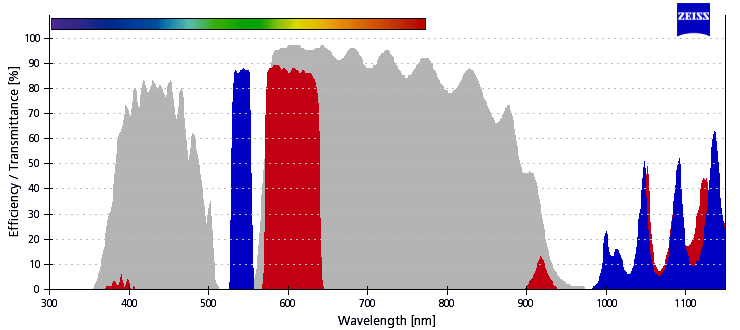
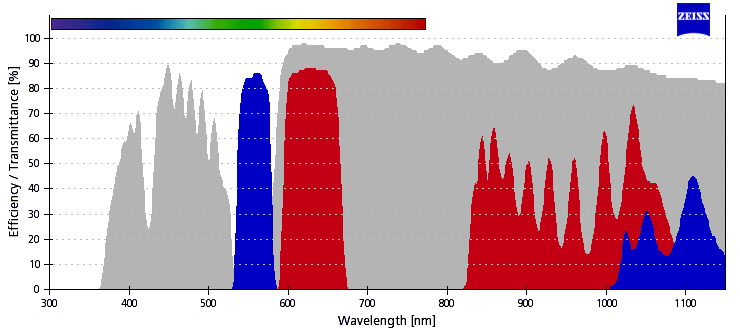
new Cy3.5 Filter cube

Replacement of the old Cy3.5 filter (Chroma "sp103v2") with a new Chroma filter set (CT580/10bp, T590lpxr, ET620/40m) - also specific to Cy3.5.

Some acquisition setups might need to be adjusted accordingly.

new Transmitted Light module

The previous halogen lamp has been replaced with an LED.

Some acquisition setup might need to be adjusted accordingly.

=> If no signal visible, please try to increase illumination voltage for the TL modes (BF, DIC, Phase, Darkfield) 

  • Cy5 channel was misaligned with TXR & Cy3: switched Cy5 & Cy3.5n fllter cubes positions (7 ↔  8). Cy5 (blue signal) was shifted in y relative to TXR and AF555 channels (left), and appears to colocalize after cube slot switch (right):
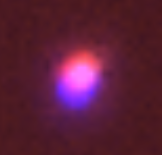
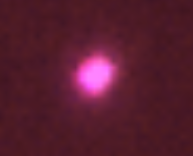
Please advise platform managers if other channels appear misaligned.
  • User guide added to Wiki French and english version
  • Objective 10-0.3 Plan NeoFluor #420340-9901-000 added
  • Parafocality adjustment using 100x-1.4 as reference
  • Condenser removed and cleaned (broken glass)
  • Zen 2.6 updated hotfix 12
  • Microsoft Windows updated
  • X-Cite Liquid light guide replaced (Transmittance was 75% remaining)
  • Fluorescence Light bulb replaced (was 2593 hours)
  • Power output at the sample using 20x objective GFP cube 488nm is 116mW
  • Objective parafocality adjusted
  • Objective Focus speed was changed 10x: 7; 20x: 6; 4-x: 5; 63x: 3; 100x-1.3: 3; 100x-1.4: 3.
  • Condenser lens cleaned (oil)
  • Data storage OK
  • Added to wiki

Technical Datasheet

Stand

  • Zeiss AxioImager Z2 upright System ID: 3523000100
    Part Number: 430000-9902
    System ID 1022265893
  • Installed on 2012-01-10
  • Camera adapter Model 60N-C, 1", 1x, Model: 426114

  • Motorized Neutral density filters for transmitted light

  • Manual Field diaphragm for transmitted light

  • Manual polarizer
  • Left imaging port with manual splitter camera adapter Model 60N-C, 1", 1x, Model: 426114
  • Trinocular with 100% ocular 40% occular/70% camera and 100% manual splitter
  • 3mm liquid light guide #805-0038
  • Zeiss 423302-0000 Collimator
  • Motorized Aperture diaphragm
  • Motorized Fluorescence field diaphragm

Light sources

  • LED Light source
  • X-Cite exacte 200 W Model XCT10A Serial: XCT10A-0156

Condenser

  • Motorized condenser #424201-9902
  • Lens NA 0.9 WD TBD Part Number: TBD

  • Manual polarizer
  • Filter turret 6 positions manual

    1. H Empty

    2. D Darkfield
    3. DIC III #426706
    4. Ph3
    5. DICII #426702
    6. Ph 2

    7. DIC 426701
    8. Ph 1

Objectives

  1. 10x/0.30 Air WD 5.30 DIC I  Plan-NeoFluar M27 420340-9901-000

  2. 20x/0.80 Air WD 0.61 DIC II Plan-Apochromat W0.8x1/36" 440640-9903-000

  3. 40x/0.75 Air WD 0.71 DIC II EC Plan-NeoFluar M27 420360-9900-000
  4. 63x/1.40 Oil WD 0.19 DIC III Plan-Apochromat M27 420782-9900-000

  5. 100x/1.30 Oil WD 0.20 DIC III Plan-NeoFluar M27 420490-9900-000
  6. 100x/1.40 Oil WD 0.17 DIC III Plan-Apochromat M27 420792-9900-000 

Stage

  • Motorized stage Marzhauser Zeiss AIM System #2502000124
  • Remote control joystick
  • Inserts
    • Slide only

Filters

10-positions motorized filter wheel #424913 #424905-0160-810

  1. DAPI Zeiss Filter Set 49 cube 424933
  2. GFP Zeiss  Filter Set 38 cube 424933
  3. YFP Zeiss  Filter Set 46 cube 424933
  4. DsRed Zeiss  Filter Set 43 cube 424933
  5. TxRed Zeiss  Filter Set 45 cube 424933
  6. Cy3.0 Chroma #SP102v1 C162410
  7. Cy3.5 Chroma #SP103v1 C162411
  8. Cy5 Chroma #49009 C162412
  9. DIC Analyzer Zeiss 424932-01
  10. Empty

Detector

  • Photometrics Prime Camera Serial TBD

Workstation

  • HP Z800 Workstation Serial: CZC1473Y0Q Part number: WJ112ECJ#AK6
  • 2 x Intel Xeon X5650 2.66 GHz
  • RAM 24 GB DDR3 1333 MHz ECC (12 x 2 GB)
  • OS 500 GB SSD 410 MB/s
  • 2 TB HD Data Storage (2 x 1 TB spanned volume) 110 MB/s
  • Video Card ATI FirePro V5800 1 GB DDR5
  • Monitor Dell ST2410  24' 1920 x 1080
  • Software Zen Blue 2.6 Hotfix 12 SN=1027739364-269733 HASP=1998640514

Incubation

  • None

Consumables

Troubleshooting

The best way to solve a problem in microscopy is to follow the light path. Starting from the light source and moving towards the detector, verify that there is indeed light after each component of the microscope

Vignetting

Reflects the fact that the field of view (hence final picture) is not completely homogeneous due to the optic parts within the microscope.

There is significant vignetting when using the full chip of the camera (2048x2048):
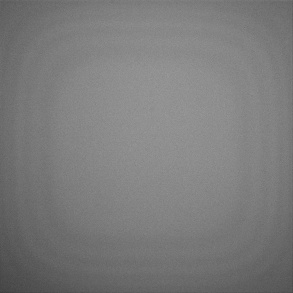
It is thus recommended to only use the 1024x1024 pixels at the center of the camera chip (pink square): 
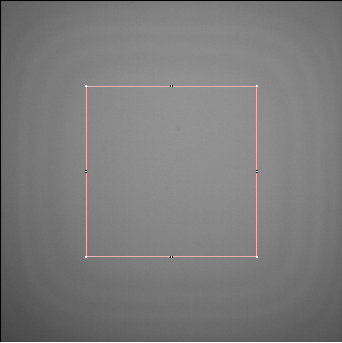
This can be defined in the acquisition parameters in Zen.

Otherwise, to capture with a more homogenous field of view you can (should) apply flat field correction, which is a background correction option in Zen. In brief you acquire an evenly illuminated image that is subtracted to all acquired images. You can use the Global option for brightfield images that will apply to all channels or a Specific option that is Channel specific. As this last correction may affect signal values, avoid using this correction if downstream quantifications rely on raw values.

FAQ

No. It is an upright microscope designed for the observation of specimens between a slide and a coverslip (thickness 0.17mm).


Core Facilities - CI2B               Structural Biology    |    Cytometry    |    Microscopy    |    Histology    |    Instruments & Services

Content published under CC BY-SA 4.0. Sharing allowed under the same license with attribution: "Original content by l'Institut Courtois d'innovation biomédicale, used under CC BY-SA 4.0"